
Blitzed Casino in Your Pocket
The Blitzed Casino app puts reels, Evolution live tables and AUD or crypto banking on the phone you already carry, so you can have a go from wherever you are. It simply asks for a login, and your balance stays shown in AUD.

Blitzed Casino on Your Phone
How the Blitzed Casino app brings the full lobby, banking and support into one pocket-sized screen.
Mobile play gives you more than one game per screen. The Blitzed Casino app opens the whole lobby from one login: slots from Pragmatic Play, NetEnt and Push Gaming, plus live tables streamed from Evolution studios. If you ever need a hand finding something, the Chat tab on the Blitzed site and app puts you in touch with support.
The titles people ask about most are all here. Gates of Olympus, Book of Dead and Starburst load in the mobile browser and in the app with the same rules and features as on desktop, and the touch controls are sized for a thumb. The lobby is split into Originals, Slots, New Releases, Blitzed Picks, Live Casino, Game Shows and Table Games, with poker in its own area, so you don't have to scroll past hundreds of slots to reach a blackjack table. Check each game's info screen for its rules before you begin.
Banking follows you onto mobile as well. You can deposit in AUD with Mastercard or use one of six cryptocurrencies: Bitcoin, Ethereum, Litecoin, Dogecoin, TRON and USDT. New players can claim the 50% welcome bonus up to A$500 plus 50 free spins by entering the code BLITZ50 in the cashier at the first deposit. Choose your method first, enter the code, and confirm the amount before you approve the payment.
If something goes wrong, open the Chat tab for live chat, or write to [email protected]. Pick whichever channel suits the question; a quick query suits chat, while anything with screenshots or transaction details sits better in an email.
Mobile Site vs App: Which Suits Your Play
How the two ways of playing Blitzed Casino on a phone compare in daily use.
Phones made the pokies lobby something you carry, and at Blitzed Casino you can reach the same lobby in two ways: through the mobile browser or through the app you install with the Download button on the site.
Both run the same account, the same AUD balance and the same welcome offer. Gates of Olympus, Book of Dead and Starburst load exactly the same either way, and Evolution live tables stream at the quality your connection allows. The differences are smaller than most people expect. They come down to how quickly you get in, how much storage you give up and how you like to see promotions. Pick whichever suits your phone, since you can switch between them using one login.
If you play now and then, the browser is enough. If you log in most evenings, the app saves a few taps each time, and over a month that adds up.
| Feature | Mobile site | App |
|---|---|---|
| Installation | None, open in any browser | Installed once via the Download button |
| Storage used | Browser cache only | A small amount of device storage |
| Login | Saved by the browser | Stays signed in on your device after the first login |
| Game library | Full lobby, including Push Gaming titles | Same full lobby |
| Live casino | Evolution tables in the browser | Evolution tables, full-screen by default |
| Payments | 6 cryptocurrencies plus Mastercard | Same 7 methods as the mobile site |
| Promotion alerts | On-site banners | Promotions shown inside the app |
| Updates | Automatic on each visit | Automatic, no manual reinstall needed |
| Support | Live chat (Chat tab), email | Live chat (Chat tab), email |
Downloading Blitzed Casino on Android
How to get the app onto your phone in a few minutes, and what to expect once it runs.
The Android app carries the whole catalogue. You have Gates of Olympus, Book of Dead and Starburst in your pocket, along with Evolution live tables and the Pragmatic Play and Push Gaming catalogues, all from one icon on your home screen.
Google Play limits real-money casino apps in many regions, so the app is downloaded through the Download button on the Blitzed site, with no direct APK file to hunt for. Your account, balance and welcome offer carry over from the desktop version, so there is no need to register a second time. Deposits in Bitcoin, USDT, Ethereum, TRON, Litecoin, Dogecoin or Mastercard work the same way they do in a browser, with balances shown in AUD.
Open the site on your phone
Visit Blitzed Casino in Chrome or any Android browser and tap the Download button in the menu.
Confirm the install
Follow the prompt your phone shows. If Android asks for permission, approve it for this install only; you can review the setting again afterwards.
Open the app
Installation is quick on most modern handsets, and the app then opens from its own icon on the home screen.
Log in or register
Sign in with your existing details or create an account, then enter BLITZ50 in the cashier at your first deposit to claim the welcome offer.
Installing Blitzed Casino on iOS
Use the Download button and add the app to your home screen in a few taps, with no App Store search.
On an iPhone, getting started takes little effort. Blitzed does not list its casino app in the App Store. Instead, the Download button on the site guides you to save the app from Safari to your home screen, and it then opens full screen from its own icon, much like a native app.
Because the site is built for mobile browsers, you get the same lobby as on desktop. That covers Gates of Olympus, Book of Dead and Starburst, live tables from Evolution, and slots from Pragmatic Play, NetEnt and Push Gaming. Deposits through the six cryptocurrencies or Mastercard work the same way inside the saved app. There is nothing large to download, and updates arrive automatically the next time you open it. If something looks out of date, close the app and reopen it before contacting [email protected].
Open Safari
Go to the Blitzed Casino site in Safari and tap the Download button. Other iOS browsers may not offer the home screen option.
Tap the Share icon
Press the square with the upward arrow at the bottom of the screen, or at the top on iPad.
Choose Add to Home Screen
Scroll the menu, select Add to Home Screen, keep the name or edit it, then tap Add.
Launch and sign in
Open the new icon, log in or register, and set your AUD or crypto deposit preferences.
Everything the Blitzed Casino App Puts in Your Pocket
The full lobby, cashier and support on a phone, all from a single login.
The full pokies lobby
Gates of Olympus, Book of Dead and Starburst sit side by side, with titles from Pragmatic Play, NetEnt and Push Gaming sorted into Slots, New Releases and Blitzed Picks.
Live tables from Evolution
The live section streams real dealers from Evolution studios straight to your screen. You get roulette, blackjack and game shows in portrait or landscape, with controls sized for a thumb.
Crypto and card cashier
Seven methods in total: Bitcoin, Ethereum, USDT, TRON, Litecoin and Dogecoin, or Mastercard if you'd rather use a card. Balances show in AUD, so there's no converting in your head.
Bonuses and rewards
The welcome offer with code BLITZ50, instant rakeback marketed as up to 50%, weekly lossback marketed as 10%, plus races, tournaments and live bounties. Exact rates are shown on the platform.
Poker on the go
The poker room sits next to the casino and slots, using the same login and the same wallet, so you don't need a second account.
Help in two ways
Open live chat from the Chat tab or send an email to [email protected]. Pick whichever channel suits your question.
Blitzed Casino App Screenshots
Screens that show how the app handles games and tournaments on a phone.
The app lays the games out in rows on a phone screen, where the rows scroll and the categories stay a tap away.
The screenshots below come from the live app. They show the casino game lobby, the lobby with its category rows (Originals, Slots, New Releases, Blitzed Picks, Live Casino, Game Shows and Table Games), blackjack game pages and the details page for a casino tournament. Use them to get a feel for the layout, and in particular where the category rows sit, before you install anything.
Gates of Olympus, Book of Dead and Starburst are easy to find in the slot rows, and the category bar keeps live tables and tournaments a tap away.
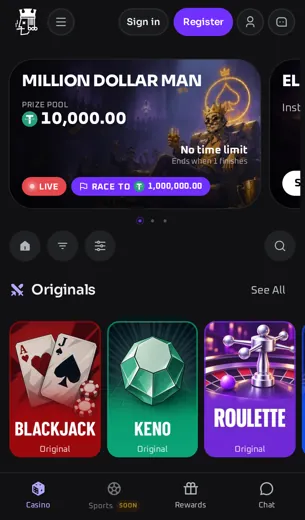 Casino game lobby
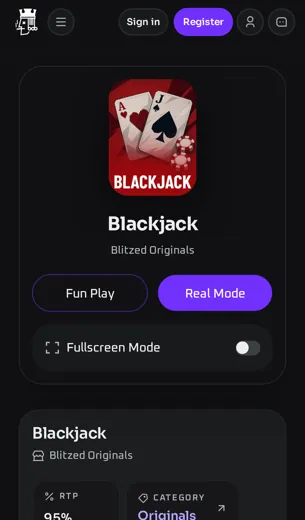 Blackjack game page
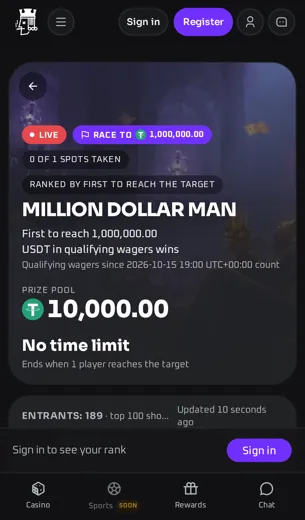 Casino tournament details
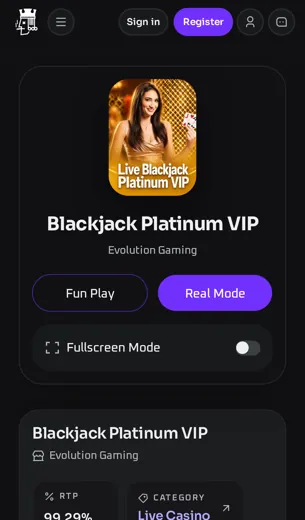 Blackjack game page on a phone
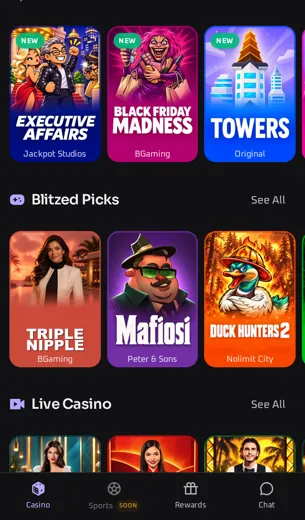 Game lobby with categories
First Deposit Bonus on the Blitzed Casino App
A 50% match up to A$500 plus 50 free spins, with the terms laid out before you play.
Simply logging in earns you nothing at an online casino. The first deposit is where the welcome bonus comes in, adding something the games alone do not.
When you make your first deposit through the Blitzed Casino app and enter the promo code BLITZ50 in the cashier, Blitzed adds a 50% match up to A$500 plus 50 free spins. Deposit in AUD by Mastercard, or use crypto such as Bitcoin, Ethereum, USDT, TRON, Litecoin or Dogecoin, and the bonus funds land in your balance next to your own money. You can use them on familiar titles like Gates of Olympus from Pragmatic Play, Book of Dead from Play'n GO and NetEnt's Starburst, or try a few Push Gaming slots. Glance at your balance after the deposit to confirm the bonus has been credited.
Read the offer terms before you confirm the deposit. The minimum qualifying amount is A$20, the wagering requirement is 35x and the bonus is valid for 30 days, and these decide how far the extra 50% really goes. Note which games count toward wagering, since slots and live tables often contribute differently, and keep the terms handy while you play.
- 50% match up to A$500 on your first deposit
- 50 free spins with the code BLITZ50
- Fiat and crypto deposits both qualify
- Full terms: 50% up to A$1,000 + 50 free spins, 35x wagering, valid for 30 days

BLITZEDBESTEnter the code in the cashier at your first deposit.The bonus works the same in the app as on the desktop site. If anything is unclear, ask the Blitzed team in the Chat tab or at [email protected] before you deposit.
App FAQ
Straight answers on installing, updating and using the Blitzed Casino app.
How do I install the Blitzed Casino app?
Open the Blitzed site on your phone and tap the Download button. On Android, follow the install prompt; on iPhone or iPad, the button guides you to add the app to your home screen from Safari. There is no direct APK file and no App Store listing to search for.
Does the app work on both iOS and Android?
Yes. Android phones install it through the Download button, and iPhones and iPads save it to the home screen from Safari. In both cases you get the same lobby, cashier and Chat tab.
How does the app get updated?
Updates arrive automatically, so there is nothing to reinstall. If a screen looks out of date, close the app fully and open it again. If that does not help, write to [email protected].
Can I use the same account in the app and on desktop?
Yes. One login covers the app, the mobile browser and the desktop site, with the same AUD balance, bonus progress and transaction history. There is no need to register twice.
Can I claim the welcome bonus inside the app?
Yes. Enter BLITZ50 in the cashier at your first deposit to get the 50% bonus up to A$500 plus 50 free spins. Read the wagering terms shown there before you confirm.
Which payment methods work in the app?
Crypto withdrawals arrive within 1 hour, e-wallets within 24 hours and cards in 1-3 business days. The minimum deposit is A$20.
How do I withdraw Bitcoin from the Blitzed Casino app?
Open the cashier, choose Withdraw, pick Bitcoin and paste your wallet address. Check the network carefully before you confirm, because crypto transfers can't be reversed.
What games can I play in the app?
The full lobby: Originals, Slots, New Releases, Blitzed Picks, Live Casino, Game Shows and Table Games, plus poker. Popular picks include Gates of Olympus, Book of Dead, Starburst and Push Gaming releases.
Who runs Blitzed Casino?
The casino is operated by Blitzed Media LTD, registered in Belize, under an Anjouan licence. Full licence details are in the legal section. This site is an independent guide about Blitzed: it does not take deposits or hold accounts.
How do I contact support from the app?
Through the Chat tab inside the app for live chat, or by email at [email protected]. Those are the only two channels.